
Projector and Screen Installation in Toronto and the GTA
Projector setups fail for predictable reasons: the projector is mounted at the wrong distance so the image never fills the screen, the screen is a few degrees off level, the cables were never planned, or nobody adjusted the lens for the room. Each of those is avoidable with measurement before mounting.
- Projector & Screen Mounting
- 15+ Years of Experience
- Clean Installation
- Homes, Condos & Businesses
- Placement Planning
- Picture Setup
- Complete cleanup after every installation
- Toronto & GTA and Suroounding Areas
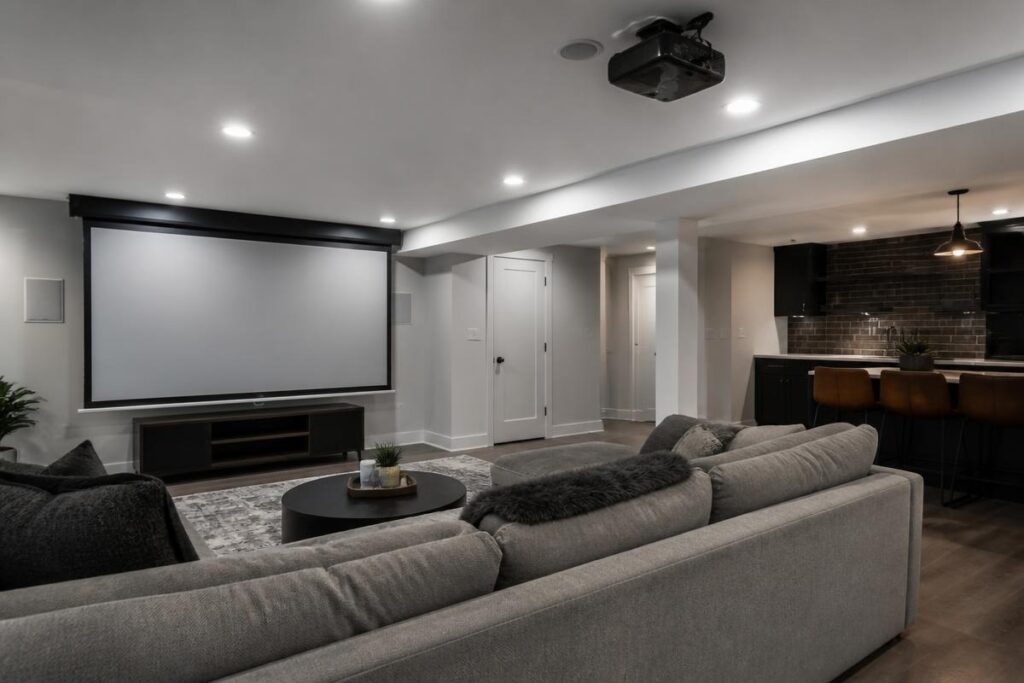
Start With the Room, Not Just the Screen Size
A larger image can change how you enjoy films, sports, and games. However, the screen needs to fit both your viewing space and the projector’s capabilities.
The distance between the projector and screen affects the image size. Seating, windows, ceiling height, and available mounting positions also shape the installation.
XproTech helps you work through these details before the equipment is fixed in place. If you already own a projector and screen, share their model numbers. If you are still choosing, discuss the proposed layout before committing to equipment or mounting positions.
Choosing the Projector Position
Ceiling-Mounted Projectors
A ceiling installation can keep the projector away from furniture and everyday movement. The bracket position must suit the projector’s image range and the supporting structure.
We also consider ventilation, access to connections, and space for maintenance. A convenient ceiling location is only useful if it works with the equipment and screen.
Shelf or Furniture Placement
Some projectors support installation on suitable furniture or shelving. The position needs to provide stable support, adequate ventilation, and the correct alignment.
Check the projector’s installation instructions before choosing an enclosed cabinet or shelf. Available space does not necessarily mean the location is suitable.
Short-Throw & Ultra-Short-Throw Setups
These projectors can create a large image from a shorter distance, but their placement is still model-specific.
Small changes in position can affect the image’s fit. Share your projector and screen details so we can assess their compatibility and the proposed installation.

What Your Projector Installation Can Include
Your quote identifies the agreed work. Depending on your equipment and room, the installation can include:
Reviewing projector and screen compatibility.
Planning screen height and projector placement.
Installing a suitable projector bracket.
Mounting a fixed-frame, manual, or motorized screen.
Planning and installing agreed signal-cable routes.
Connecting compatible source equipment.
Adjusting image position, focus, and available picture settings.
Checking playback with the connected equipment.
Mounts, additional cables, wire concealment, audio setup, and electrical work should be clarified separately in your quote.
Projector Screen Installation Options
The screen affects how the room looks and how you use it between viewing sessions.
Fixed-Frame Screens
A fixed-frame screen stays in place on the wall. It can suit a dedicated entertainment area where the screen remains part of the room.
Planning includes the overall frame dimensions, viewing height, wall support, and space around the screen.
Manual Pull-Down Screens
A manual screen retracts when you do not need it. It may suit a shared room where a permanent exposed screen is less practical.
The housing needs suitable support, and the lowered screen must clear furniture, doors, and other obstructions.
Motorized Screens
A motorized screen opens and retracts using its supported controls. Installation planning includes the housing, mounting method, screen travel, and access to power.
Electrical alterations or recessed-ceiling construction are separate requirements. They should not be assumed included in screen mounting.
Screens Designed for Ambient Light
Some screens are designed to reduce the effect of certain room lighting. Their suitability depends on the projector type, screen material, viewing angles, and light direction.
These screens do not remove the need to consider windows and lighting. Confirm compatibility before choosing one, especially for a short-throw or ultra-short-throw projector.
Getting the Picture to Fit
Projection Distance
The projector’s model and lens determine the distance range available for a particular image size. We use the relevant equipment information to plan placement rather than applying one distance to every projector.
Screen Height & Seating
The screen should work with your usual viewing position and the room’s available space. Furniture, ceiling height, and any speakers below the screen can affect its position.
Alignment & Focus
Physical placement comes first. Lens shift and optical adjustments can help where the projector supports them.
Digital image correction may be available, but it should not replace suitable placement where that is practical. The goal is an appropriately aligned, focused image within the equipment’s capabilities.
Room Lighting
Daylight and nearby lighting affect the viewing experience. We discuss how you expect to use the room so screen placement and picture settings reflect those conditions.
Basic picture setup is different from specialist, instrument-based calibration. Any additional calibration service would need to be specifically agreed.
Plan Cables, Power & Sound Before Mounting
A projector may sit some distance from your streaming device, games console, or receiver. That makes connection planning an important part of the installation.
Tell us where each device will be located and which features you want to use. Cable type, length, and compatibility need to suit the equipment and route.
Our wire concealment service can be discussed where you want a tidier cable finish. Concealed routing depends on access, construction, and cable suitability.
New outlets or changes to fixed electrical wiring require separate arrangements. Ordinary extension cords should not be treated as an in-wall power solution.
For speakers, receivers, and several connected devices, explore our home theater setup service. If you prefer a soundbar, ask about soundbar installation and compatibility with your proposed projector system.
Projector Setups for Homes & Workspaces
Basement & Dedicated Movie Rooms
Plan the screen around your seating and use the available room depth to assess projector placement. Tell us about ceiling finishes, bulkheads, and existing equipment that could affect the layout.
Living Rooms & Shared Spaces
Consider how the room works when the projector is not in use. A retractable screen or suitable furniture-based arrangement may be worth discussing alongside cable access and lighting.
Meeting & Presentation Rooms
Share your seating layout, presentation devices, and expected use. The screen position needs to support visibility, while connections should be practical for the people using the room.
If a television would better suit the space, you can also explore our office TV installation service.
How to Arrange Your Installation
01
Share Your Equipment & Room Details
Send the projector and screen models, approximate room dimensions, location, and photos. Mention your preferred image size and any equipment you still need to choose.
02
Review Placement & Connections
We discuss the mounting positions, supporting surfaces, cable routes, and source devices. Some concealed structural details may require checking on site.
03
Confirm the Quote & Preparation
Your quote outlines the agreed installation and materials. Any required electrical work, construction, or decorating should be identified separately.
04
Install & Check the Setup
The agreed mounting and connection work is completed, followed by image alignment, focus, and playback checks using the available equipment.
What Affects Projector Installation Costs?
Each room and equipment combination has different requirements. Pricing factors include:
Projector model, weight, and bracket type.
Ceiling height, structure, and access.
Screen size, housing, and mounting method.
Cable length and concealment requirements.
Existing power and connection locations.
Source devices and agreed audio setup.
Any additional preparation or installation work.
You can provide suitable mounts and cables. XproTech can also help select and bring necessary installation materials by arrangement, with supplied items confirmed in the quote.
Serving Toronto, the GTA & Surrounding Communities
XproTech provides projector and screen installation across Toronto and nearby areas, including Mississauga, Brampton, Vaughan, Richmond Hill, Markham, Oakville, Burlington, and Milton.
For wider coverage, check our service areas or send your postal code to confirm availability.
Browse the XproTech installation gallery for examples of entertainment layouts and completed work.
Projector & Screen Installation Questions
The correct distance depends on the projector model, lens, and intended image size. Some models allow placement within a range, while others are more restrictive. Share the model number and screen dimensions so the proposed position can be checked.
Yes. Send the projector, screen, and mount details before booking. We assess their compatibility with the proposed room layout and installation. Existing equipment may require different cables, mounting hardware, or a revised position.
Yes, you can enquire about installing a screen separately. Include the screen model, size, housing type, and proposed wall or ceiling position. If you already have a projector, share its details so the screen location can be considered alongside it.
That depends on the supporting structure, projector weight, and bracket requirements. The visible ceiling finish alone does not confirm suitability. Photos help with planning, but the structure may need checking before a mounting position is confirmed.
It may, but daylight affects the image. Projector capability, screen choice, window position, and light control all matter. Explain whether you mainly watch during the day or evening so the installation can be planned around realistic conditions.
Not automatically. Projector and screen installation focuses on the agreed display setup. Speakers, receivers, soundbars, and additional audio configuration should be included in the enquiry so they can be quoted as part of the wider project.
We can assess concealment options based on your ceiling, walls, cable requirements, and equipment positions. In some rooms, concealed routing is practical. Others may need surface covers or a different route. Electrical requirements are considered separately.
The time depends on the screen, mounting surfaces, access, cable routes, and connected equipment. Installing a screen on its own differs from fitting a ceiling projector with concealed connections. We can discuss the expected appointment length once the scope is clear.
Ready to Plan Your Bigger Screen?
Send your projector and screen details, a few room photos, and your location. Tell us how you want to use the space, and we’ll help you work through the installation requirements.
Planning other work? Explore all XproTech installation services.